

Get it. PIN it. Swipe it.
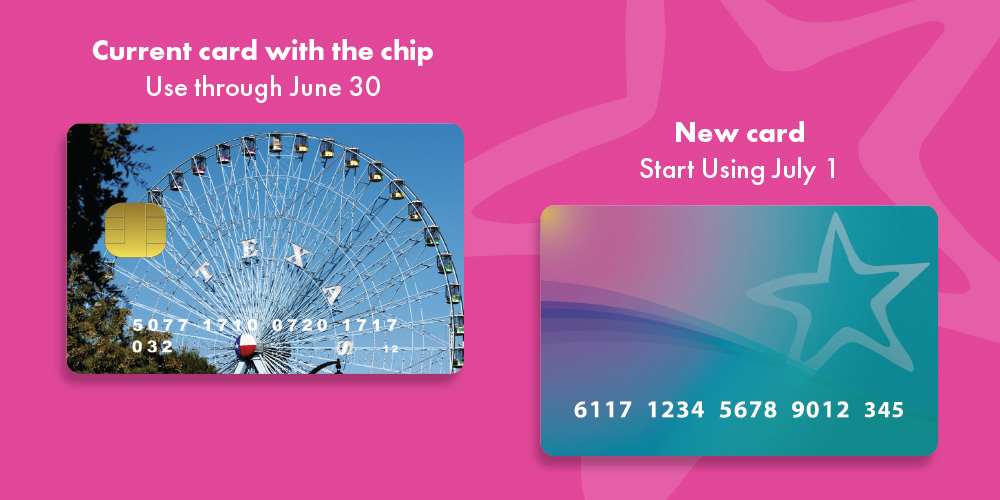
New cards are coming soon and bringing some big improvements for Texas WIC families! With the new card, your benefits and purchases will update instantly in the myWIC app.
What You Need to Know About Your New Card
- Get it at an upcoming appointment between April and June 2026.
- Set your PIN before you shop.
- Swipe your new card at stores starting July 1, 2026.
Continue using your current WIC card with the chip until June 30, 2026. Keep your new card in a safe location until July 1. Remember to set your PIN before your first shopping trip in July.
Two ways you can set your PIN
myWIC
- Tap the three lines for the menu. Go to Card Management under Account.
- Find the card that starts with 6117.
- Tap the edit button and select Manage PIN.
Call the Texas WIC Card Management Line at 833-966-1382.
- Enter the ZIP code from your mailing address.
- Enter the date of birth of the parent or guardian.
- Set your PIN
When setting your PIN, avoid using common choices like 1234, repeating numbers like 1111 or important dates like birthdays.
Download myWIC
With the myWIC app, you can schedule appointments, view benefits, get help with shopping and more. When you get your new Texas WIC card, you can set your PIN with just a few taps in myWIC. Register for myWIC today, so you are ready when you get your new card.


Frequently Asked Questions
-

 How will I get a new card?
You will get a new card at your regularly scheduled WIC appointment between April and June 2026. If you don’t already have an appointment scheduled during this time, contact your WIC office.
-
When can I use my new card?
You will use your new card starting July 1, 2026. Keep your new card in a safe place until it’s time to use it. Continue using your current WIC card with the chip through June 30, 2026.
-
How do I set my PIN?
You can set your PIN with myWIC or by calling the Texas WIC Card Management Line at 833-966-1382. You must set your PIN before you shop starting on July 1.
-
What if I forgot my PIN or want to change the PIN for my new card?
If you forgot your PIN or want to change your PIN, you can update it using myWIC or by calling the Texas WIC Card Management Line at 833-966-1382. Follow the same steps you used to set your PIN.
-
What do I do with my old WIC card with the chip?
The old WIC cards with the chip will not be active after July 1, 2026 and cannot be used to redeem WIC benefits. You can throw away the old chip card after July 1, 2026. You do not need to return the card to the WIC office. Please cut up or shred your card with the chip before throwing it away to dispose of it properly.
-
How do I request a replacement card if my new card was lost, damaged or stolen?
There are three ways to request a replacement card.
- On myWIC, go to Card Management under Account. Find the card that starts with 6117 and tap the edit button. Select Replace Card. myWIC will then provide options to replace your new card through the mail or at your local WIC office.
- Call the Texas WIC Card Management Line at 833-966-1382 and follow the instructions to get a replacement card through the mail.
- Contact your local WIC office.
If you need a card quickly or if it is close to the end of the month, please contact your local WIC office. It can take 7-10 business days to receive a card by mail.
-
I requested a replacement card by mail but I haven’t received it yet. What do I need to do?
If you have not received your replacement card by mail after 10 business days, contact your local WIC office for assistance.
-
What if I have questions or issues with my new WIC card?
Getting help with your Texas WIC card is easy!
Use the myWIC app to:
- Set or change your PIN.
- Check your current and future monthly benefits and track purchases.
- Get help shopping for WIC foods.
- Cancel your card and request a replacement.
- Manage your appointments.
Call the Texas WIC Card Management Line at 833-966-1382 to:
- Set or change your PIN.
- Check your current month’s benefits and recent purchases.
- Cancel your card and request a replacement.
Contact your WIC office:
- For questions about your card.
- For changes to your benefits.
-
What is myWIC?
myWIC is a free smartphone app and online portal where you can schedule appointments, view benefits, get help with shopping and more. When you get your new Texas WIC card, you can set your PIN in myWIC with just a few taps. Register for myWIC today, so you are ready when you get your new card. Learn more about myWIC.
-
Do I link my old or new WIC card when registering for myWIC?
When registering for myWIC, the app will ask you to enter a 19-digit card number. After July 1, only new WIC cards that start with 6117 can be used to register for myWIC.
-
How do I set my pin if I speak a language other than English or Spanish?
- English – Set PIN Card Management Line Instructions
- Spanish – Set PIN Card Management Line Instructions
- Arabic – Set PIN Card Management Line Instructions
- Dari – Set PIN Card Management Line Instructions
- French – Set PIN Card Management Line Instructions
- Pashto – Set PIN Card Management Line Instructions
- Vietnamese – Set PIN Card Management Line Instructions
-
What if I forgot my PIN or want to change the PIN for my new card?
If you forgot your PIN or want to change your PIN, you can update it using myWIC or by calling the Texas WIC Card Management Line at 833-966-1382. Follow the same steps you used to set your PIN.
-
I received my new WIC card, how do I use it to shop?
Continue using your current WIC card with the chip through June 30, 2026. Starting July 1, you will swipe your new WIC card with the magstripe at the checkout and enter the PIN.
-
Why is my new card not working when I swipe it at the store?
Continue using your current WIC card with the chip through June 30, 2026. Starting July 1, you will swipe your new WIC card at the store. If your new card is not working after July 1, you will receive one of the following error codes at the point of sale.
- PIN Not Selected: A PIN is not set for this card. You can set a PIN with myWIC or by calling the Texas WIC Card Management Line at 833-966-1382.
- Invalid PIN: A PIN is set for this card, but the incorrect PIN was entered. The card will automatically lock on the fourth try of an incorrect PIN. If you forgot your PIN, you can reset it easily with myWIC or by calling the Texas WIC Card Management Line at 833-966-1382.
- PIN Tries Exceeded: If you enter the incorrect PIN four times, the new card will be locked. You will see an error message that says “PIN Tries Exceeded.” If you get this message, you can use myWIC or call the Texas WIC Card Management Line at 833-966-1382 to reset your PIN. Once the PIN is reset, you can swipe your WIC card again and enter the new PIN at checkout. If you do not reset your PIN, the card will unlock automatically at midnight.
- No Account on File: Contact your local WIC office for assistance.
-
How do I unlock my card if I have entered the wrong PIN too many times at the grocery store checkout?
Starting July 1, if you enter the incorrect PIN four times, the new card will be locked. You will see an error message that says “PIN Tries Exceeded.” If you get this message, you can use myWIC or call the Texas WIC Card Management Line at 833-966-1382 to reset your PIN. Once the PIN is reset, you can swipe your WIC card again and enter the new PIN at checkout.
If you do not reset your PIN, the card will unlock automatically at midnight.
-
Can I place a temporary freeze or hold on my new WIC card?
If you have myWIC, you can freeze your new WIC card. The freeze will place a temporary hold on your new WIC card and you will not be able to use it at the store. You can unfreeze your card at any time. You must unfreeze the card before you shop.
In myWIC, go to Card Management under Account. Select the card starting with 6117. Tap the edit button and select Freeze Card.
-
Can I check my benefits if my card is cancelled or frozen?
If you have myWIC, you can check your benefits if your card was cancelled or frozen.
If you do not have myWIC, call the Texas WIC Card Management Line at 833-966-1382 to check your benefits if your card is frozen. If your card was cancelled, you can contact your WIC office to check your benefits.

Use the myWIC app to check your benefits, view the Texas WIC Shopping Guide, schedule appointments and more!

 Have any questions?